Picking the best 10% of the ideas that our brains produce

Category: ecommerce

  • How to become more efficient by automation

    Now many of you might want to become more efficient and don’t know how – here you go – by automation.

    For me, it all usually starts with being annoyed by very repetitive tasks. Those are the tasks that mostly are boring – and I really don’t like boring.

    Background of the story

    So back in days I had to export certain data-set daily (weekends included!) into the shared folder that was transferred to certain other systems before 8 o’clock in the morning. In e-commerce, there is a great need to have certain lists exported and imported into other systems (for sending marketing campaigns out, for example).

    And I didn’t like waking up during weekends. I really didn’t. And there was this other problem – if I was off, somebody else had to do it.

    Manual Automation

    So the first step from “fully manual” to manual automation was to write a SQL query that uses calculated dates/times instead user changing the SQL query. Yep, this one is easily achievable with some knowledge of SQL:

    SELECT *

    WHERE “DATE” >= CURRENT_DATE() – 1;

    This will give you last 1 day changes in the query.

    I also think that part of manual automation are the following steps:

    • Putting export files, based on the above statement, to a shared drive
    • Sharing those files with people that will manually import it to other systems
    • Import those files into the required system

    (Full) Automation

    This is where you really make a difference – save yourself some (a lot) of time and let the computers do the heavy (repetitive) lifting. You can invest your precious time on the important stuff!

    Now here you can go down multiple roads:

    1. write the automation scripts yourself
    2. search for automation/integration tool

    Write scripts yourself

    If you have good programming knowledge (or you think you can Google anything and make a decent version of code) and not really budget to introduce automation/integration tools, you should write your own automation scripts.

    If you really want it to be a proper automated solution, you might want to put it into a cloud, which is online 24/7 (or at least configurable to be online when it needs to be online). Besides that, you will need some online storage to put files. And it needs to allow some sort of triggers.

    We used Apache Airflow as an orchestration tool and Python scripts (stored within GitHub) to load data between systems. The scripts were connecting to source systems, execute certain SQL statements and move data to (AWS) bucket. The other task in the Apache Airflow was triggered after the previous was finished and that task pushed data from a bucket into the Marketing System.

    Automation Tools

    Especially in the e-commerce area there are a lot of integration tools that will help you automate your data pipelines.

    They will allow you, by drag and drop and clicking, to automate most of your data transfers. They usually defer based on the number of integrations with different systems and tools you are using.

    It is essential to write down all your tools and systems you’re using and try to find a tool that supports all or most of them. If they don’t support some, they should allow you to use some language (Python, R, …) to cater for your needs for special systems. And make sure that you can get a proper support.

    Testing

    I would recommend you spend some time to test and, if possible, you should work on different systems – development, production – to avoid sending wrong marketing campaigns to wrong people.

    Conclusion

    So how to become more efficient by automation? If you want to become more efficient, you should do it by automation. Automate the repetitive tasks will also make you happier and able to focus on the important challenges. And it can also improve your profit.

    And it will make your whole business more scalable and reliable – you will remove the human factor (such as “I forgot to upload file”, “My internet didn’t work”, …)
  • How to set up subscriptions business with WooCommerce

    You’ve decided to set up your web shop and WooCommerce platform is one of the potential candidates, but now you wonder “How can you set up subscriptions business with WooCommerce“?

    Firstly – WooCommerce needs WordPress website, you just cannot do without it, sorry 🙂

    But what else do you need to successfully start your subscription-based business? Here are some modules that will make your life better:

    • WooCommerce Subscriptions is a module for managing orders that are subscriptions. It is a paid module, cca 199USD.
    • WooCommerce Stripe Gateway is a module you will need for receiving payments.
    • Yoast SEO is used for Search Engine Optimization, which is practically something you need that Google and Bing appreciate when they crawl your website.
    • WPML will make your life easier if you’re offering content in multiple languages. It is a paid module, but it’s worth the money; it will help you in an easy way to translate your content into multiple languages.
    • Cookiebot | GDPR/CCPA Compliant Cookie Consent and Control is a module that will make sure you’re compliant with the GDPR laws. It’s a must.
    • Facebook for WooCommerce makes it easier to connect your Facebook page and ads with your webshop.
    • Mailchimp for WooCommerce is a module that will connect to Mailchimp to automatically integrate your Email Service Provider – this is used for marketing campaigns.
    • MC4WP: Mailchimp for WordPress is an additional module for connecting to Mailchimp.
    • MC4WP: Mailchimp Top Bar will allow your users to sign-up to marketing emails from your business.
    • Site kit by Google will allow you to integrate Google Analytics and Webmasters tools to your WooCommerce webshop
    • Smush optimizes the pictures and this will help visitors get a better user experience when coming to your website.
    • Product Feed PRO for WooCommerce is handy to send products to Google, see more information: Product Feed

    You can search for them here: https://woocommerce.com/products/

    Additionally to this, you will need to do arrange the supporting systems:

  • How do I start my own e-commerce business

    You’re starting an e-commerce business and you’re thinking “How do I start my own e-commerce business?“. Yeah, you decided you have enough courage to start. But you’re not technical enough. Congratulations!

    This article is mostly intended for companies that want to test the market for their ideas. Company that wants to sell things on-line.

    Now some of the important things to consider are:

    • are you selling products vs. subscriptions based
    • how much budget do you have for an e-commerce platform
    • do you have knowledge for setting up an e-commerce platform
    • are there some payment types you prefer (credit cards, debit cards, local payment methods, bitcoin …)
    • are you offering physical or “virtual” products

    Products vs. Subscription based

    Physical products are part of your stock mostly, so once you sell them you need to replenish them. It could be necessary to have stock, meaning you need money to buy it, or you can go down the lane of dropshipping.

    What is dropshipping? You don’t need to pay for stock up front – other companies have the stock. After you sell it on your website, you buy. This is a good idea for starting a business.

    Budget

    Ideally you have some money to use to try your business model. Some of the possible costs you might think about when budgeting, are:

    • marketing costs
    • technology costs
    • shipping fees
    • office/warehouse costs
    • stock (if you’re selling physical products and need stock)

    Of course this is a very simple and short list, but this is really mostly what you need if you want to test the market for your idea. After you have decided you want to continue, you will probably need to budget more costs.

    Technical knowledge about e-commerce platforms

    Are you a technical person with programming knowledge? Setting up an e-commerce platform should be easy for you 🙂

    If you’re not – you might consider finding a person to help you out with that part (or of course – you can contact us to help you).

    Payment methods

    There are a lot of different payment methods, but mostly you can group them into the following:

    • credit cards
    • debit cards
    • cash payments (yes, that is still possible)
    • Crypto

    If you’re offering your products/services globally, it’s easiest to use credit cards option.

    But if you’re working on a local market, then you might consider going to more localized methods. That mostly means that people trust those payment methods more than credit cards, or at least they know how to use them. It usually also means that the transaction costs associated with the payment are lower (mostly).

    Use case: Resportly

    When we started Resportly, we knew we want to:

    • offer subscription-based lease of sports gear
    • we have a limited budget, but not 0
    • we have internal technical knowledge, but less knowledge about sports gear – so testing business was possible through technology
    • we prefer local payment methods (iDeal) to credit cards
    • we will be using a combination of dropshipping and buy-as-we-need (when an order comes in, we will buy the sports gear)

    E-commerce platforms

    There are different e-commerce platforms. Some of them that we tested are:

    • Shopify: general shop, best for selling physical products, easy to use, monthly subscription + payment fees. For selling subscriptions there are possible modules for an additional fee.
    • Subbly: specialized in subscription-based shops, easy to use, monthly subscription + payment fees
    • WooCommerce: most complicated for a beginner, but it offers a lot of customization – you can install additional plugins (functionality). Free software but you will need a web hosting provider, which charges a monthly fee.

    Now – How do I start my own e-commerce business and which platform to choose?

    You try them

    We started with Shopify to see their functionality. We liked how fast we were able to launch and easy it is to use. And simplistic design.

    But there was no out of the box functionality for subscriptions. And that would require additional monthly costs.

    We tried this in combination with local payment methods and it didn’t work – which would mean higher costs for us and our users.

    We tried Subbly, which is simple to use and it’s meant for subscription-based businesses – all good. But no support for local payment methods, which would bring the costs up.

    We ended up with WooCommerce, which took more time to implement, but luckily we had technical knowledge. It offered local payment methods, which we needed. And it was more customizable than other SaaS solutions. And it offers an easy blogging platform, too. Read more here.

    Some advice

    Consider what’s important for you and your consumers

    Try not to over-think your business model, rather get right to it – rapid prototyping

    Connect with technical people (if needed)

  • Product Feed

    Product feed are files (such as CSV, TXT, XML) that contain information about products.

    You would want this to share your products with search engines (Google Merchant Center) or maybe to share your product with your Social Media Store – Facebook Store.

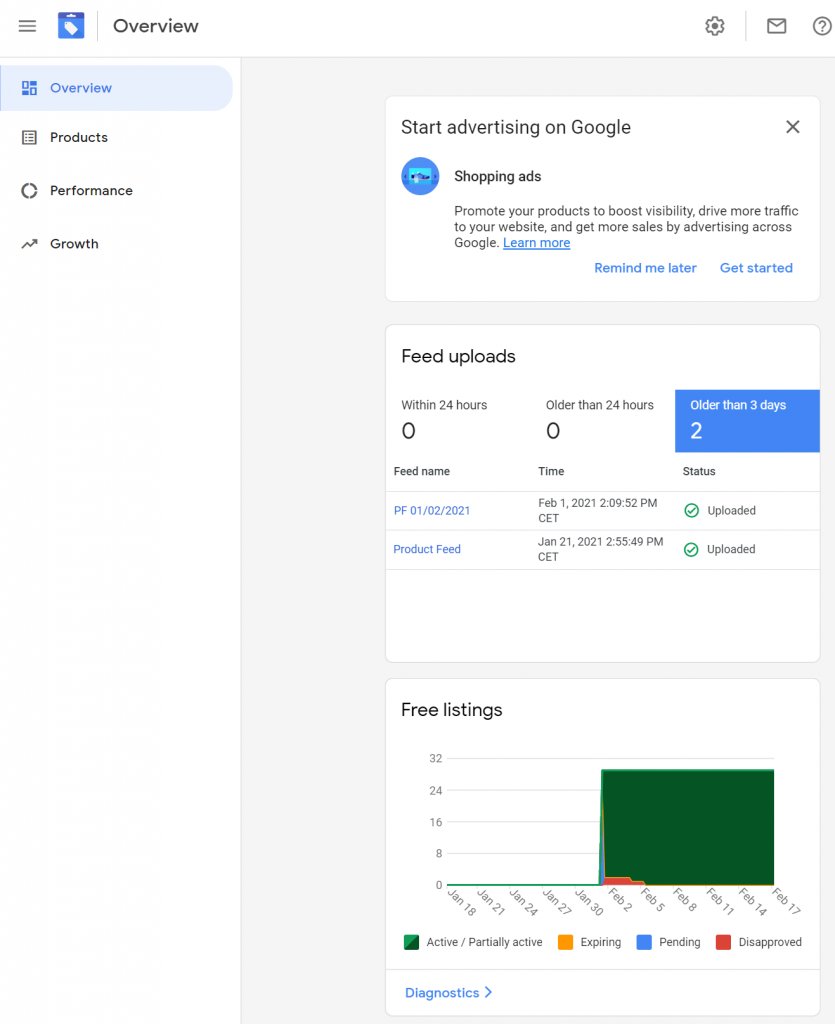
    Google Merchant Center
    Google Merchant Center Example

    Why would you need that?

    Because it can lead to higher conversions on your website.

    How can you do that?

    Depends on the technologies you have available; there are many solutions available that you can just click and set things up or you might end up writing extensive Python and SQL scripts that would transfer files from one source to destination.

    I’ll focus here on Plugin available in WooCommerce, called Product Feed Pro, which you need to install in Plugins section of your WordPress website.

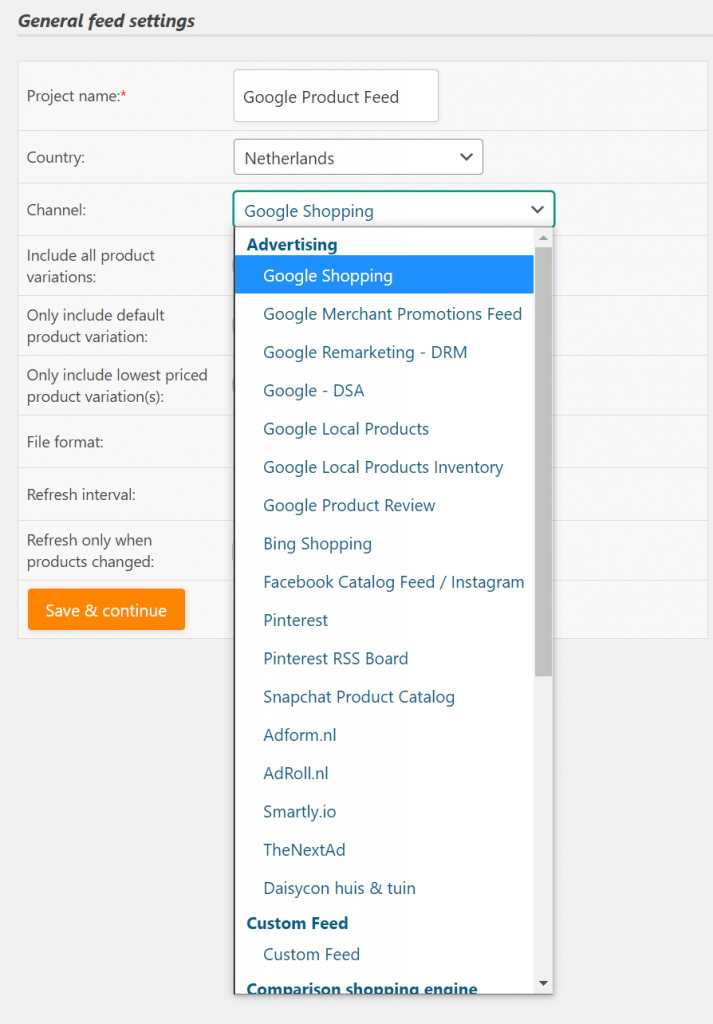
    Select the right Channel for your Product Feed
    You have a variety of options where you can push products to – from Google to Facebook and Pinterest, but also some options that are country specific.

    Setup the Google Shopping feed for your country, by selecting Country and Channel = ‘Google Shopping’.

    Depends on the products you’re using, select Include product variations (if you use simple and variations products). Or maybe you want to include only default product variation.

    You might want to include only lowest priced product variations to attract more customers to your website.

    The most suitable format for Google Shopping is XML, so pick XML.

    We chose Daily Refresh interval.

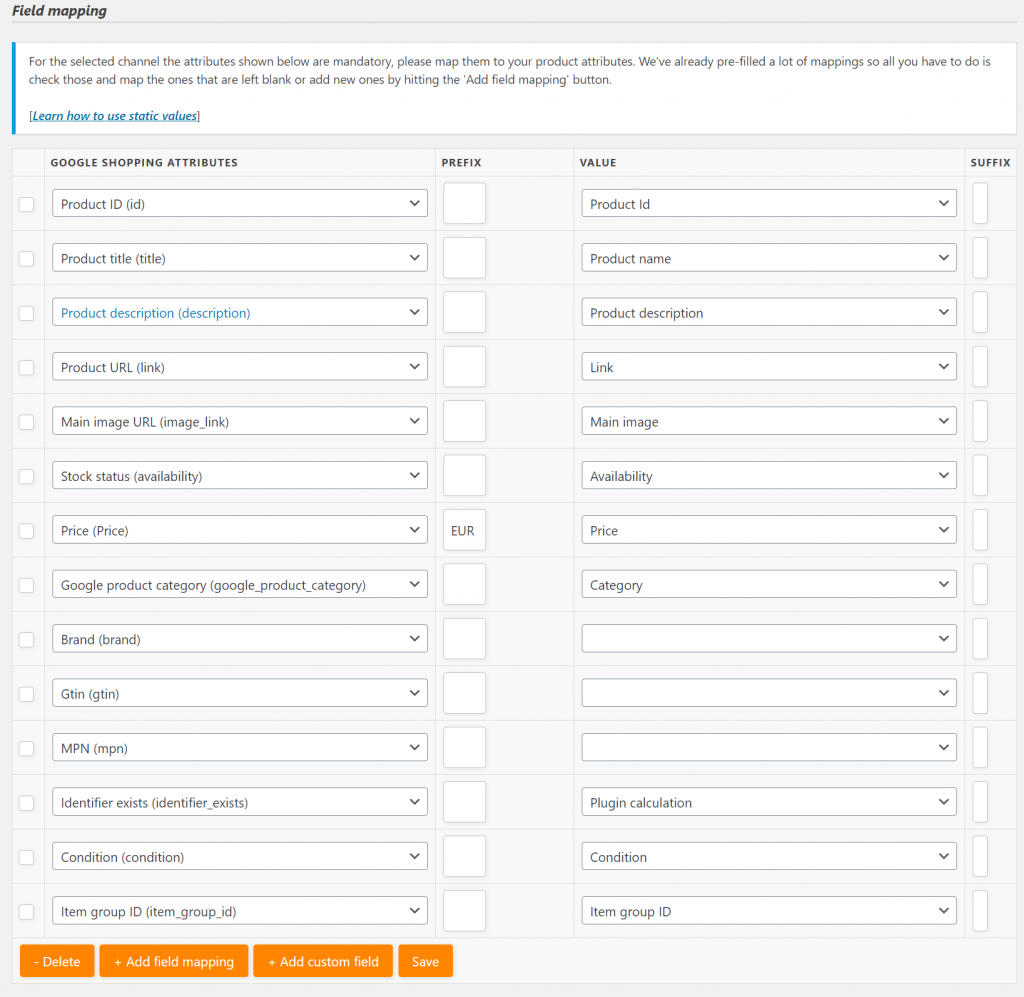
    On the next page, you will have to define a field mapping, which will tell Product Feed Pro where to find necessary data to send to Google Shopping

    Field Mappings
    Field Mappings

    Mandatory fields for Google Shopping. It becomes difficult to find all the GTIN’s – and those are mandatory for Google Shopping – usually you will get them (EAN codes) from supplier, sometimes you might just Google them.

    If you’re using free version of the tool, you will have to create a new custom attribute on product and select it from drop down.

    After you’ve configured the Product feed, you can download it

    Download Product feed.
    Click on Download

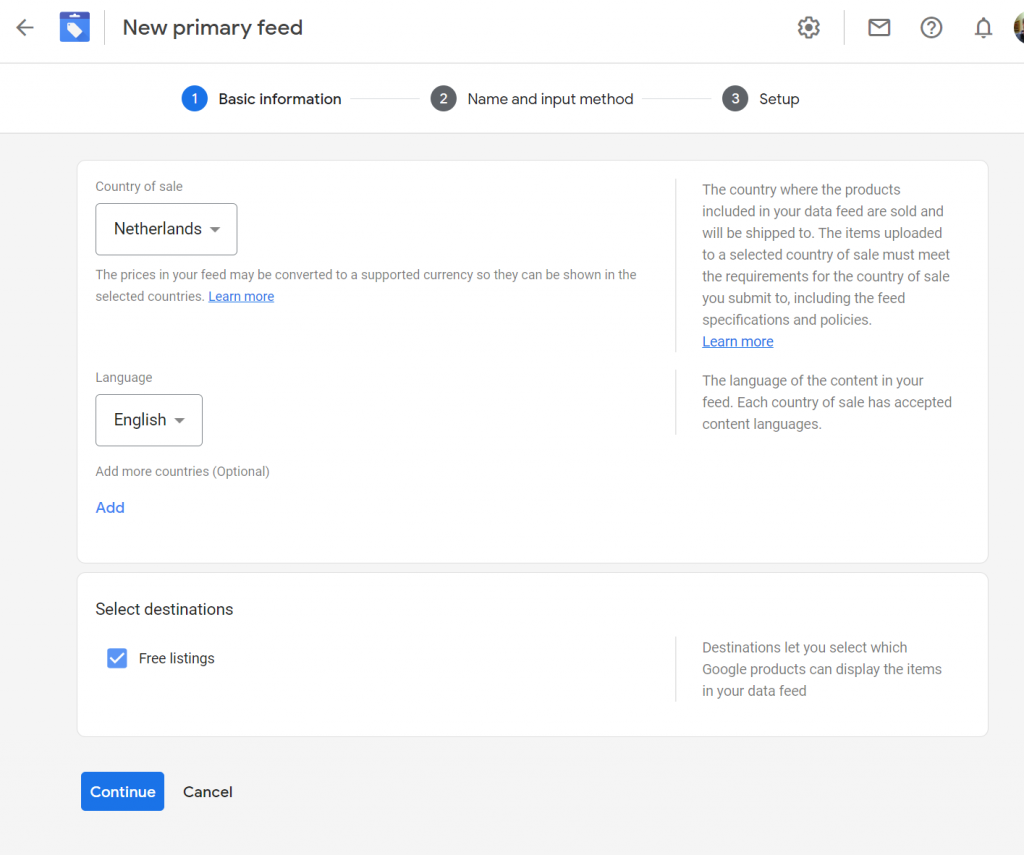
    Go to Google Merchant > Products > Feeds and click on “+”.

    Define Country and Language.

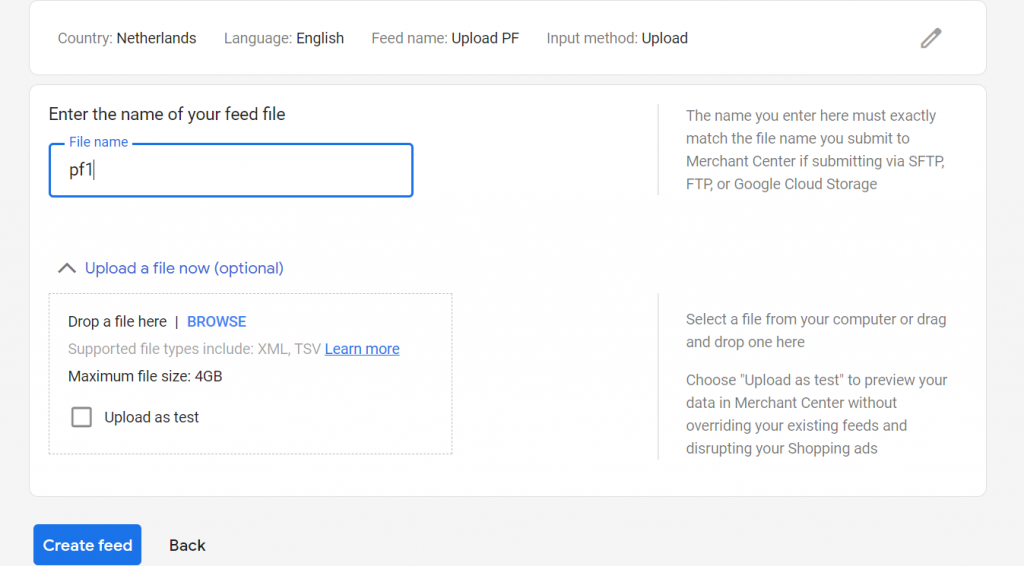
    Enter Product Feed name, and select a way how you’d like to add products.

    Upload file to Google Shopping

    Click Create Feed. It might take some time to process and approve the products. You will get email notified.

    That’s it!

    We’ve used this on www.resportly.com.